
Install Zoom on Ubuntu

You can install Zoom on Ubuntu in two ways:
1. Installing through Ubuntu Software install
Firstly, we need to download the Zoom package from Zoom official website.
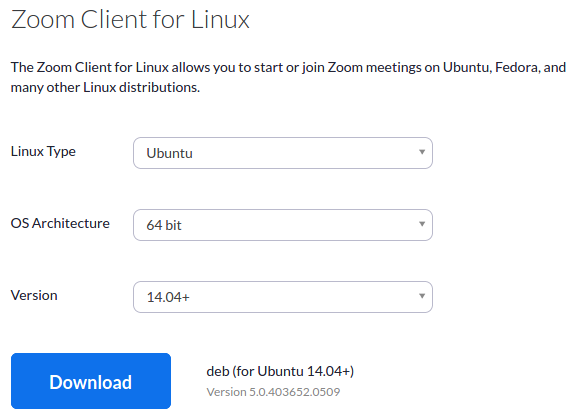
Go to URL: https://zoom.us/download#client_4meeting
- Choose Linux Type (Let’s choose Ubuntu)
- Choose OS Architecture (64 bit/ 32 bit)
- Choose OS version (12.04 / 14.04+)
- Click on the “Download” button and .deb file will be downloaded.
Now, install the downloaded package
- Go to your “Downloads” directory and select the downloaded .deb file.
- Right-click on this file and choose the option “Open With Software Install”
- Click the “Install” button in the Ubuntu software window.
- You have to provide your system’s root password to authenticate the installation request.
- Enter the root password in the Authentication popup. and click the “Authenticate” button.
2. Installing through terminal
Download the Zoom package using the following command:
# wget https://zoom.us/client/latest/zoom_amd64.deb
Run the following command to install the downloaded package
# sudo dpkg -i zoom_amd64.deb
Note: You need the system root password to install the package on your PC.
Ready to Solve Your Most Complex Technical Challenges?
Our senior advisors are ready to help you navigate the ever-evolving technology landscape with precision and expertise.
Schedule a ConsultationRelated Articles

GDPR: General Data Protection Regulation
The European Union’s General Data Protection Regulation on data privacy came into effect on May 25, 2018. This new regulation policy applies…

Steps for the Effective Application Development Process
Step 1: THE IDEA Assist customers with creating and building their unique idea. Share suggestions to the client and answer inquiries about…

Support wildcard subdomains for your Facebook app
Use case:There is a SAAS based platform and each customer will be having their subdomains. If I want to give the “Facebook…