
Setting up Cron Jobs on AWS EC2

Cron Jobs are scheduled tasks running at a specified frequency.
In the AWS EC2/ dedicated server, we have to set up the cron using CLI (with root login access).
Steps to setup Cron Jobs on AWS EC2:
1. Log in to your AWS EC2 using CLI/SSH.
2. Run the following command
# crontab -e
Please note, while running Crontab command for the first time you will see the option to choose your editor like this:
/bin/ed
/bin/nano
/usr/bin/vim.basic
/usr/bin/vim.tiny
Choose 1-4?
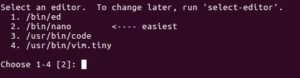
3. Choose your favorite editor and hit Enter. It will open the editor selected by you.
4. Add path of your function, for which you want to setup the cron like this:
0 * * * * php /var/www/public_html/cronjobs/sendnewsletter.php
OR
0 * * * * /bin/php /var/www/public_html/cronjobs/sendnewsletter.php
OR
0 * * * * wget X.X.X.X/cronjobs/sendnewsletter.php
First term “0 * * * *” is Cron expression.
Second term “php or /bin/php or wget” is command/path. The command path will change depends on the programming language.
The third term is the file Path.

5. After entering the cron job command, you have to save it.
6. To check the list of running Cron Jobs, run the below command.
# crontab -l
Ready to Solve Your Most Complex Technical Challenges?
Our senior advisors are ready to help you navigate the ever-evolving technology landscape with precision and expertise.
Schedule a ConsultationRelated Articles

Different deployment environments!
Many organizations these days are utilizing numerous deployment environments, which their DevOps groups use to approve the necessary features prior to moving…

Microservices architecture
Microservice architecture is a method of software development to break down the application into small isolated functions which are called “services”. Services…

AMI – Amazon Machine Image
AMI is basically a template/blueprint of a Virtual instance. AMI provides the information required to launch an instance like Operating System, Application…